

RFC 9421
Signed agent
Cryptographic identity of an automated client.
System abstract
AgentBouncer verifies an AI agent's identity using HTTP Message Signatures under RFC 9421, binds the signature to the body using Content-Digest under RFC 9530, independently validates the OAuth 2.1 user, and applies project policies. The protected API or MCP tool receives one final decision — allowed.
RFC 9421
HTTP Message Signatures
RFC 9530
Content-Digest
IETF DRAFT
Web Bot Auth
AUTHORIZATION
OAuth 2.1 + PKCE
RFC 9421
Cryptographic identity of an automated client.
OAuth 2.1
Independent user identity and scopes.
Project policy
Action, tool, trust parameters, and OAuth requirements.
AgentBouncer
Only allowed is the final decision
Protected operation
The API or MCP tool executes only after a positive decision.
Agent identity, user authorization, and project policy are verified independently and combined into one final decision.
RFC 9421 · OAuth · PolicyRFC 9421 HTTP Message Signatures
OAuth 2.1 + PKCE for the user
Replay protection for every signature
Policies for APIs and MCP tools
RFC 9421 verification path
AgentBouncer combines RFC 9421 HTTP Message Signatures, RFC 9530 Content-Digest, Web Bot Auth agent identity, an OAuth 2.1 user, and rules for a specific API or MCP operation.
raw request
Preserve the exact external URL, HTTP method, original headers, and body bytes before performing the protected API or MCP operation.
RFC 9421 · RFC 9530
Signature-Input, Signature, the time window, intent tag, signed components, and compliance of the RFC 9530 Content-Digest with the actual body bytes are verified.
Web Bot Auth identity
AgentBouncer uses a project signing key or a public key from a registered provider and verifies that the HTTP signature has not been used before.
OAuth 2.1 · PKCE
If the policy requires a user, the access token is independently verified against the issuer, JWKS, audience, expiration, and scopes. The authorization code flow uses PKCE.
policy decision
DENY and ALLOW rules consider the agent, action, tool, trust parameters, and OAuth scopes, then return the final verification.allowed.
Web Bot Auth + OAuth 2.1
AgentBouncer extends the cryptographic identity of an automated client with rules for protected APIs and MCP tools. RFC 9421 identifies the agent, OAuth 2.1 represents the user, and the project API key selects the protected server's policy.
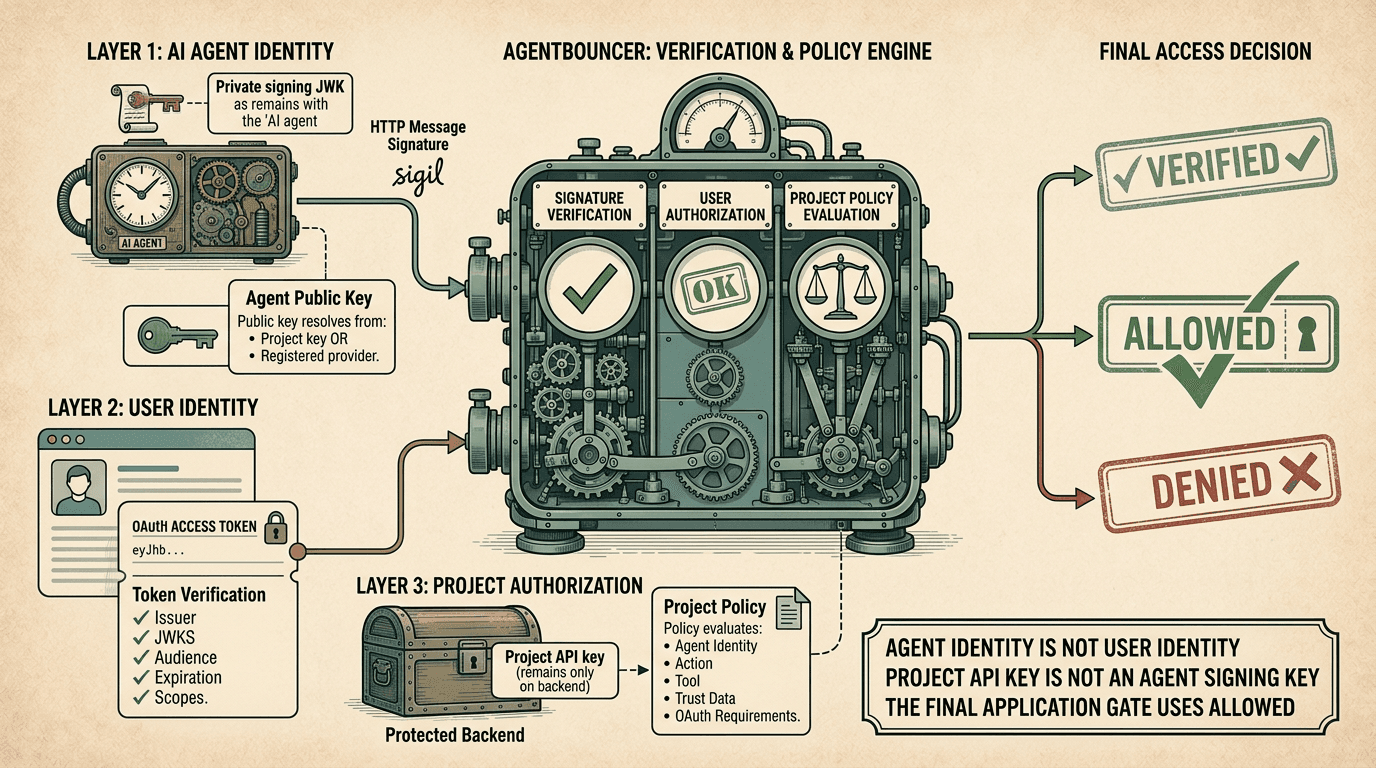
The private signing JWK remains with the agent. The project API key remains on the protected server. The OAuth 2.1 access token represents the user. These identities are not interchangeable.
Agent · User · ProjectAllow project signing keys for your own agents or public keys from registered providers. The signature is bound to the exact URL, method, and request body.
The OAuth token is verified against the issuer, JWKS, audience, expiration, and scopes. A valid agent signature alone does not mean that the user authorized the action.
ALLOW and DENY rules consider the agent type, provider tier, project key, action, tool, and OAuth requirements. DENY takes precedence.
The SDK compares Content-Digest with the exact incoming bytes before parsing JSON. A body modified after signing is rejected locally.
A successfully verified signature is consumed by replay protection. A resend, retry, or request after OAuth requires a new signature.
Analyze verified, allowed, signer, risk, action, tool, OAuth status, policy result, and replay state. Data can be exported to CSV.
Recommended rollout
Run MONITOR_ONLY on real traffic, identify actions, tools, OAuth scopes, and trusted identities, then move to a strict policy.
OAuth 2.1 for MCP
An RFC 9421 HTTP Message Signature answers the question, “Which automated client sent the request?” An OAuth 2.1 access token answers a different question: “Which user authorized that client to access the MCP resource?” Project policy may require both identities at the same time.
Critical integration rule
Request A may be cryptographically verified and consumed by replay protection before the oauth_token_required response is returned. After the OAuth 2.1 authorization code flow with PKCE, the agent must create Request B with an entirely new RFC 9421 signature.
AI agent
A signed request is created without a user access token.
AgentBouncer
The agent identity, Content-Digest, and replay-protection state are verified.
Signature A has already been consumed
Project policy
The policy requires an independently authorized user identity.
OAuth and user
The user authorizes access, after which the client receives a short-lived token.
AI agent
An entirely new request and HTTP signature are created.
The token is attached after signing
AgentBouncer
The agent, user, scopes, and project policy are verified independently.
The OAuth access token represents the user. The RFC 9421 signature represents the agent. Project policy may require simultaneous verification of both identities.
OAuth 2.1 · PKCE · MCPRFC 9421 request
AgentBouncer verifies the HTTP Message Signature, Content-Digest, and agent identity. If the project policy requires a user, it returns HTTP 401 with the oauth_token_required reason.
OAuth 2.1 and PKCE
The MCP client starts the authorization code flow with PKCE, obtains user consent, and receives a short-lived access token for the required resource and scopes.
New RFC 9421 signature
A new request and a new signature are created. The Authorization bearer token is attached after signing, while AgentBouncer independently verifies the agent, user, scopes, and project policy.
Integration
The SDK verifies the RFC 9421 HTTP Message Signature, RFC 9530 Content-Digest, replay protection, OAuth 2.1 access token, and project policy, then returns the full decision structure.
Verify the raw Request before request.json() so that the RFC 9530 Content-Digest is compared with the actual incoming bytes.
Create a new RFC 9421 signature for every request, retry, and repeated attempt after OAuth 2.1.
Pass action and tool to apply project policy to a specific API or MCP operation.
Use verification.allowed as the only final authorization gate.
import {
        createAgentBouncer,
        getRequiredOAuthScopes,
        isOAuthRequired,
        isOAuthScopeDenied,
      } from "@agentbouncer/sdk";

      const agentBouncer = createAgentBouncer({
        apiKey: process.env.AGENTBOUNCER_API_KEY!,
        publicOrigin:
          process.env.AGENTBOUNCER_PUBLIC_ORIGIN,
        validateContentDigest: true,
      });

      export async function POST(request: Request) {
        // Verify before reading the body.
        const verification =
          await agentBouncer.verify({
            request,
            expectedTag: "web-bot-auth",
            action: "tools:call",
            tool: "weather",
            forwardAuthorization: true,
          });

        if (!verification.allowed) {
          const oauthRequired =
            isOAuthRequired(verification);

          const scopeDenied =
            isOAuthScopeDenied(verification);

          return Response.json(
            {
              error: oauthRequired
                ? "oauth_required"
                : scopeDenied
                  ? "insufficient_scope"
                  : "agent_access_denied",

              requiredScopes: oauthRequired
                ? getRequiredOAuthScopes(verification)
                : undefined,
            },
            {
              status: oauthRequired ? 401 : 403,
              headers: {
                "Cache-Control": "no-store",
              },
            }
          );
        }

        const body = await request.json();

        return Response.json({
          ok: true,
          city: body.city,
          agent: verification.agent,
          user: verification.oauth,
        });
}Start with a real protected action
We are gradually opening access to projects that protect AI-agent APIs, MCP tools, and autonomous operations.
Open beta
Tell us about your API, MCP server, or agent workflow. After reviewing your application, we'll send an invitation and help you choose your first integration scenario.
Access to AgentBouncer and the SDK during the open beta.
Verification of your first endpoint in MONITOR_ONLY mode.
Direct feedback to the product team.
Enterprise
For teams with multiple agents, custom MCP servers, OAuth infrastructure, or special access-policy requirements.
Review of the trust architecture and threat model.
Design of agent, user, and project policy integration.
A tailored pilot implementation plan.
An open beta application does not automatically create an account. Access is granted by invitation after your use case has been reviewed.
Application → Review → InvitationProduct updates, MCP security, and the evolving standards for AI agents.

The Agent2Agent Protocol, or A2A, is an open protocol for communication between independent AI agents. It defines how a client discovers the capabilities of a remote agent, selects a compatible interface, sends a message, tracks task execution, and receives the result. A2A does not require…
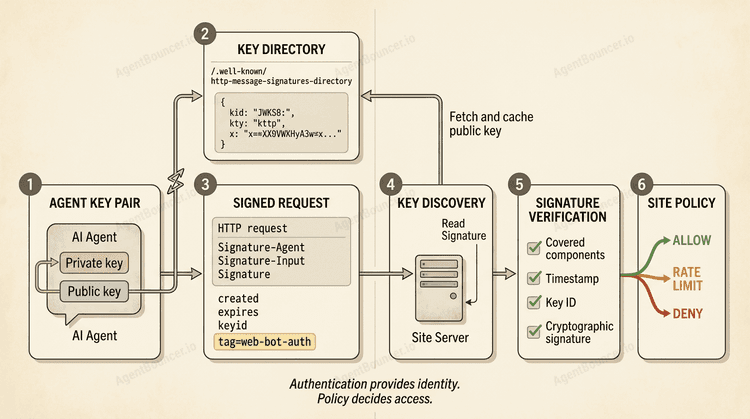
Updated August 4, 2026 Web Bot Auth is an evolving IETF approach to cryptographic authentication for automated HTTP clients. A bot or AI agent signs a request with a private key, and the website verifies the signature using a published public key. Unlike a User-Agent string, the signature provides…
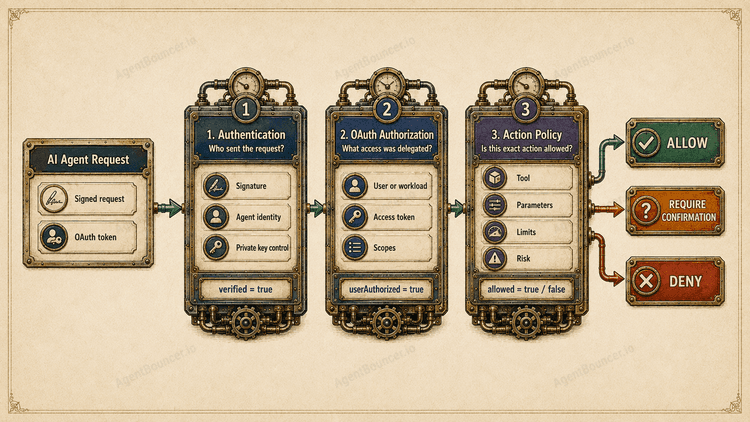
Updated August 1, 2026 AI agent authentication confirms who sent a request and which private key the sender controls. Authorization determines what that agent may do on behalf of a user, with a specific resource, tool, and set of operation parameters. A valid signature or OAuth token does not…
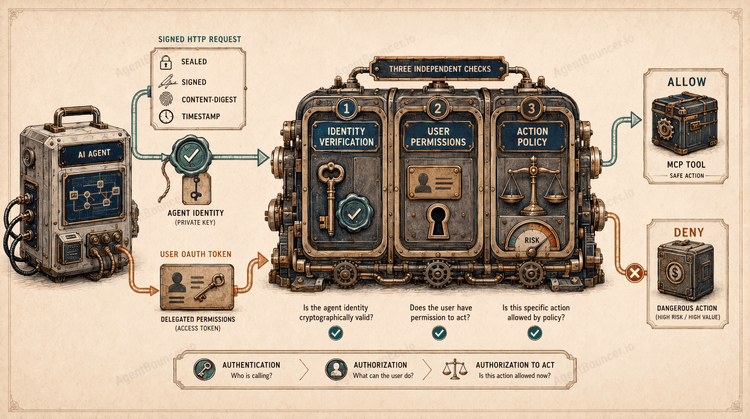
In Brief AI agent authentication verifies which cryptographic key was used to sign a request. The server then associates that key with an agent, provider, or specific deployment. An OAuth token does not replace agent identity: it conveys the user’s delegated permissions, but a standard bearer token…
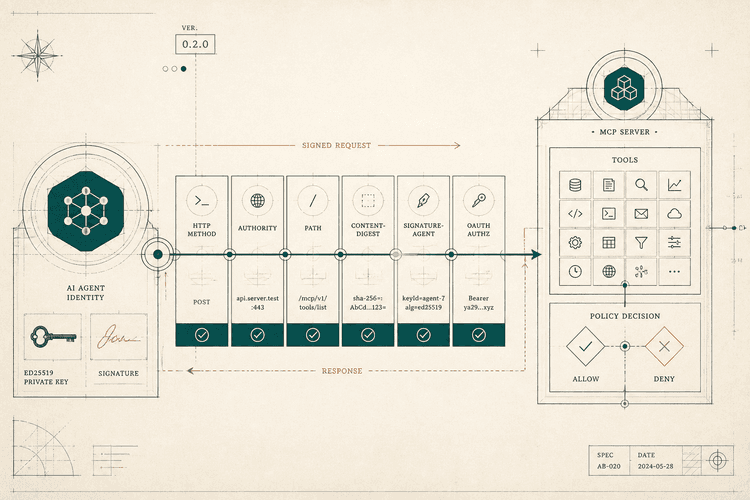
On July 21, 2026, we released @agentbouncer/sdk version 0.2.0 and updated AgentBouncer’s policy management tools. The SDK now supports server-side request signing, request-body integrity validation, and user OAuth token forwarding in addition to incoming request verification. Since launching the…
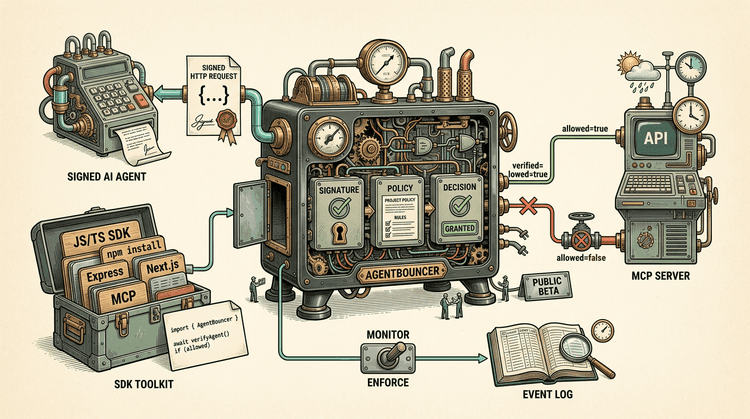
AgentBouncer launches its public beta We are launching the public beta of AgentBouncer, a service for verifying signed requests from AI agents and controlling their access to APIs and MCP tools. The beta includes the first release of our JavaScript and TypeScript SDK, integration documentation, and…