

Updated August 1, 2026
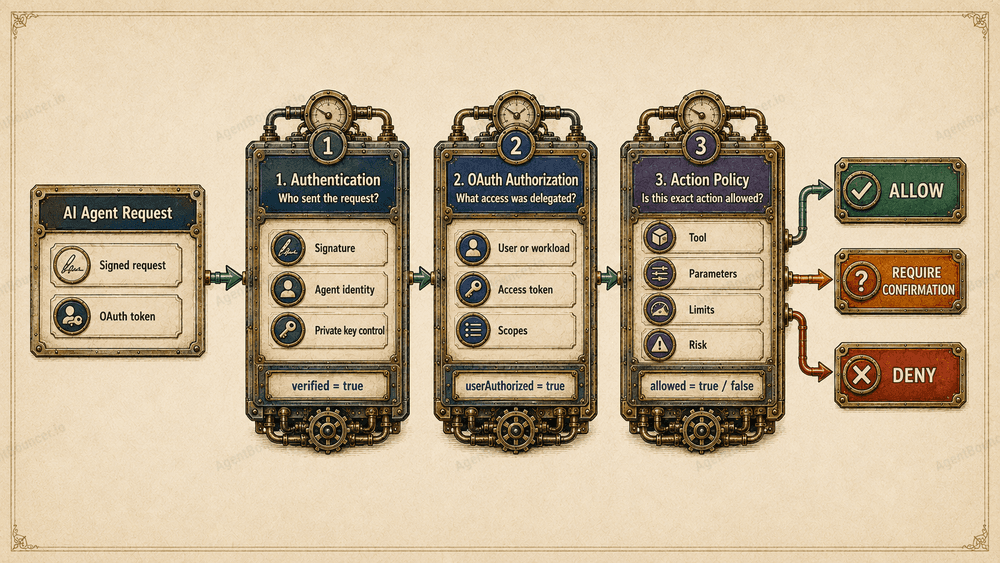
AI agent authentication confirms who sent a request and which private key the sender controls. Authorization determines what that agent may do on behalf of a user, with a specific resource, tool, and set of operation parameters. A valid signature or OAuth token does not provide unlimited access on its own.
In Brief
- Agent authentication answers: “Who sent this request, and which private key do they control?”
- OAuth authorization describes the permissions that a user, application, or another subject delegated to the client.
- Action authorization determines whether a specific operation may be performed with the supplied parameters.
- A valid signature proves the sender’s identity, not the safety of the decision made by that sender.
- A standard OAuth bearer token can be used by any process that obtains its value, so it does not always prove the agent’s identity.
- Before executing an MCP tool, the server should normally verify the signature, token, scopes, target resource, operation parameters, replay status, and access policy.
- The final decision should be represented by
allowed, not merely byverified.
Table of Contents
- The Key Difference Between Authentication and Authorization
- Key Terms in 30 Seconds
- What AI Agent Authentication Proves
- What AI Agent Authorization Means
- Where OAuth Fits into This Model
- Agent Identity and User Identity
- Why Scopes Are Not Enough
- Step-Up Authorization for Sensitive Actions
- Three Practical Scenarios
- Decision Matrix
- Authentication and Authorization in MCP
401vs.403- Why the Model Must Not Make the Final Decision
- Recommended Architecture
- AgentBouncer Example
- Common Mistakes
- FAQ
An AI agent sends a correctly signed request:
POST /mcp
tools/call → delete_production_database
The server verifies the signature and confirms that the request genuinely came from a known agent.
Should the operation be executed?
No—at least not based on successful authentication alone.
The signature proves who sent the request. It does not tell the server:
- whether the user authorized deletion of the database;
- whether the agent has the necessary permissions;
- whether policy allows this tool to be called;
- whether the operation matches the current task;
- whether the agent has been affected by prompt injection;
- whether the request was intercepted and replayed.
That is why AI agent authentication and authorization are related but independent security layers.
The distinction can be summarized as follows:
Authentication:
“Who sent the request?”

User authorization:
“What permissions were delegated to the client?”

Action policy:
“May this exact action be performed right now?”
For autonomous agents, identity verification alone is almost never sufficient.
The Key Difference Between Authentication and Authorization
Authentication normally happens before authorization.
First, the server establishes who is requesting access to the resource. It then determines which actions that subject is allowed to perform.
| Check | Primary question | Example |
|---|---|---|
| Agent authentication | Who sent the request? | The signature was created with a registered key |
| User authorization | Which permissions were delegated? | The token contains the calendar.events.create scope |
| Action authorization | Is this specific operation allowed? | The agent may create an event but cannot delete a calendar |
| Integrity verification | Was the request modified? | Content-Digest matches the body |
| Replay protection | Has this request already been used? | The fingerprint is absent from the replay cache |
| Risk evaluation | Are additional restrictions required? | A large payment requires user confirmation |
These are not alternative security mechanisms. Each layer addresses a different problem.
A useful way to represent the final evaluation is through three independent results:
{
  "verified": true,
  "userAuthorized": true,
  "allowed": false
}
In this example:
verifiedmeans the agent passed cryptographic verification;userAuthorizedmeans valid user authorization was presented;allowedmeans the policy denied the specific action.
Only allowed should determine whether the tool is executed.
Key Terms in 30 Seconds
| Term | Meaning |
|---|---|
| Authentication | Verification of a subject’s identity or control over a credential |
| Authorization | Determination of which actions a subject may perform |
| Access token | A credential representing permissions granted to a client |
| Scope | A class of permissions, such as files.read or payments.create |
| Policy | A rule that allows or denies a specific operation |
Related concepts—including bearer tokens, proof of possession, replay protection, and HTTP Message Signatures—are covered in the previous article: “AI Agent Authentication: Identity, Authorization, and Access Control”.
What AI Agent Authentication Proves
Practical AI agent authentication can involve three steps:
- The server receives a signed request.
- It verifies the signature using a public key.
- It associates that key with a registered agent, provider, or deployment.
The result might look like this:
{
  "verified": true,
  "agent": "https://agent.example.com",
  "provider": "Example AI",
  "keyId": "agent-key-2026-08",
  "trustTier": 2
}
The server now knows that the request was signed by the owner of the corresponding private key.
But this field:
{
  "verified": true
}
does not mean:
{
  "allowed": true
}
RFC 9421 allows a recipient to verify that signed HTTP message components were not modified in transit and were signed by the owner of the corresponding key. It does not define a complete trust model, business policy, or authorization rules.
What Authentication Does Not Prove
Successful identity verification does not confirm that:
- the user authorized the requested action;
- the agent may access the specified MCP tool;
- the payment amount is within the permitted limit;
- the recipient is on an allowlist;
- the agent’s decision was not caused by a malicious instruction;
- the request is not a replay of a previously accepted message;
- the key does not belong to a compromised deployment;
- the operation matches the user’s original intent.
Authentication provides input for subsequent authorization. It does not replace authorization.
For requests with a body, integrity verification through Content-Digest is also important. Signed components and replay protection are covered in more detail in the AI agent authentication guide.
What AI Agent Authorization Means
Authorization determines which operations a subject may perform after all required credentials have been verified.
A decision may depend on a combination of:
agent identity
+ user identity
+ OAuth scopes
+ resource
+ action
+ tool
+ parameters
+ risk
+ current context
The same agent may receive different decisions:
calendar.events.read
→ ALLOW

calendar.events.create
→ ALLOW

calendar.calendars.delete
→ DENY

payments.send, amount=20 USD
→ ALLOW

payments.send, amount=5000 USD
→ REQUIRE_USER_CONFIRMATION
This is action-level authorization: the server evaluates not only the subject and the general permission class, but also the exact action being requested.
Naming Convention Used in the Examples
To avoid mixing OAuth scopes, internal policy actions, and tool names, the examples use a consistent naming style:
OAuth scope → dot notation:
payments.create

Policy action → colon notation:
payments:create

MCP tool → snake_case:
payments_send
These values are semantically related, but they do not have to be identical strings.
Where OAuth Fits into This Model
OAuth is designed to grant limited access to a protected resource.
In a user-facing scenario, an access token may represent permissions that the resource owner delegated to the client:
{
  "iss": "https://auth.example.com",
  "sub": "user-1842",
  "aud": "https://mcp.example.com",
  "scope": "calendar.read calendar.events.create",
  "exp": 1785603600
}
At a minimum, the server should verify:
- the trusted issuer in
iss; - the intended resource or audience;
- the token’s expiration time;
- the required scopes;
- other mandatory claims and restrictions;
- the JWT signature or introspection result, depending on the token format and profile.
OAuth defines a delegated-access model, but an access token does not necessarily represent a human user. It may be issued to a workload, application, or client_credentials flow.
The server should interpret sub as a user only when that meaning is guaranteed by the token profile and authorization server configuration.
OAuth 2.0 defines an access token as a credential representing granted authorization, while scopes limit the access granted to the client (RFC 6749, Sections 1.4 and 3.3).
Why an OAuth Token Is Not Always the Agent’s Identity
Consider this request:
Authorization: Bearer USER_ACCESS_TOKENA standard bearer token can be used without any additional proof of key possession.
If the token value is obtained by:
- a malicious process;
- another agent;
- a compromised MCP server;
- an employee with access to logs;
- a third-party integration,
the server may see a valid token but still be unable to determine which software subject actually presented it.
In other words:
OAuth access token
→ describes the access that was granted

Request signature
→ proves control over the sender’s key
These signals complement one another.
Sender-constrained mechanisms such as DPoP or mTLS-bound access tokens can reduce the risk of token theft. DPoP binds a token to a public key and requires proof that the presenter controls the corresponding private key (RFC 9449).
Proof of possession still does not answer the central business question: should this specific operation be allowed?
Agent Identity and User Identity Are Not the Same
A typical autonomous-agent request may contain two independent identities:
Agent identity:
verified through an HTTP Message Signature

User authorization:
verified through an OAuth access token
For example:
POST /mcp HTTP/1.1
Host: mcp.example.com
Content-Type: application/json
Authorization: Bearer USER_ACCESS_TOKEN
Content-Digest: sha-256=:BODY_DIGEST:
Signature-Agent: "https://agent.example.com"

Signature-Input: sig1=("@method" "@authority" "@path" "content-digest" "signature-agent");
  created=1785600000;
  expires=1785600060;
  keyid="agent-key-2026-08";
  tag="web-bot-auth"

Signature: sig1=:BASE64_SIGNATURE:
The tag="web-bot-auth" parameter associates the signature with the expected purpose of the request. A server may reject a cryptographically valid signature if the endpoint expects a different intent tag.
After verification, the server has two separate contexts:
{
  "agent": {
    "identity": "https://agent.example.com",
    "verified": true
  },
  "user": {
    "subject": "user-1842",
    "scopes": [
      "documents.read",
      "documents.summarize"
    ]
  }
}
A third decision is still required:
{
  "action": "documents:export",
  "tool": "documents_export",
  "destination": "https://external.example.com/upload",
  "allowed": false,
  "reason": "external_destination_not_allowed"
}
The user authorized the client to read documents and create summaries. That does not mean the agent may export the original files to an external server.
![Separation of AI agent identity, user identity, and the policy engine’s final decision
Why Scopes Are Not Enough
Scopes define the boundaries of granted access, but they are usually broader than an individual operation.
A scope such as:
payments.createmay permit payment creation. It does not answer:
- how much money may be sent;
- which currencies are permitted;
- which recipients are allowed;
- how many operations may be performed per day;
- whether international transfers are permitted;
- whether user confirmation is required;
- whether a newly registered agent may make the call;
- whether the operation matches the user’s task.
Those decisions require a policy engine.
A conceptual policy might look like this:
IF
  agent.trustTier <= 2
  AND user.scope includes "payments.create"
  AND action == "payments:create"
  AND tool == "payments_send"
  AND amount <= 100
  AND recipient in user.allowlist
  AND replay == false
THEN
  ALLOW
ELSE
  REQUIRE_CONFIRMATION or DENY
This is pseudocode, not the syntax of a specific product. In practice, the check may be implemented with Cedar, Open Policy Agent, a custom policy engine, or AgentBouncer project policies.
A scope is an input to authorization, not the final authorization decision.
Step-Up Authorization for Sensitive Actions
Not every tool needs the maximum set of OAuth scopes from the beginning.
For example, when the client first connects, it may request only:
documents.readIf the user later asks the agent to export a document, the server may respond:
HTTP/1.1 403 Forbidden
WWW-Authenticate: Bearer error="insufficient_scope",
  scope="documents.export",
  resource_metadata="https://mcp.example.com/.well-known/oauth-protected-resource"
Cache-Control: no-store
The client then starts another authorization flow and requests an expanded set of permissions.
Under the current MCP specification, the client must calculate the union of the previously requested and newly required scopes:
previous scopes:
documents.read

challenged scopes:
documents.export

new authorization request:
documents.read documents.export
This prevents a step-up flow from issuing a new export token while accidentally dropping the previously granted read permission.
The server should return all scopes required for the current operation at once instead of requesting them one at a time across multiple cycles. The client should also limit the number of retries to avoid an infinite authorization loop. These requirements are defined by the MCP 2026-07-28 step-up flow.
A new scope still does not guarantee that the operation will be performed:
documents.export
+ destination in corporate allowlist
→ ALLOW

documents.export
+ destination controlled by unknown third party
→ DENY
Step-up authorization expands delegated permissions. It does not bypass action-level policy.
Three Scenarios That Show the Difference
Scenario 1: Known Agent Without an OAuth Token
The agent calls:
calendar_create_eventThe signature is valid, and the identity is known. However, policy requires user authorization with this scope:
calendar.events.createResult:
{
  "verified": true,
  "userAuthorized": false,
  "allowed": false,
  "reason": "oauth_token_required"
}
Practical response:
HTTP/1.1 401 Unauthorized
WWW-Authenticate: Bearer
  resource_metadata="https://mcp.example.com/.well-known/oauth-protected-resource",
  scope="calendar.events.create"
Cache-Control: no-store
The agent has been authenticated, but the required user credential is missing.
Scenario 2: Valid Signature but Insufficient Scope
The agent presents a token with this scope:
calendar.readBut it requests:
calendar.events.createResult:
{
  "verified": true,
  "userAuthorized": true,
  "allowed": false,
  "reason": "insufficient_scope"
}
Response:
HTTP/1.1 403 Forbidden
WWW-Authenticate: Bearer
  error="insufficient_scope",
  scope="calendar.events.create",
  resource_metadata="https://mcp.example.com/.well-known/oauth-protected-resource"
Cache-Control: no-store
The credentials are valid, but they do not provide the required permission.
Scenario 3: All Credentials Are Valid, but the Action Is Dangerous
The agent has:
- a valid signature;
- a known identity;
- an OAuth token;
- the
payments.createscope.
It requests:
{
  "tool": "payments_send",
  "amount": 5000,
  "currency": "USD",
  "recipient": "new-recipient"
}
Policy permits automatic payments only up to $100, and payments to new recipients require manual confirmation.
Result:
{
  "verified": true,
  "userAuthorized": true,
  "allowed": false,
  "reason": "user_confirmation_required"
}
The current request is not executed. The server may return 403 with an application-level error code and create a separate confirmation flow:
HTTP/1.1 403 Forbidden
Content-Type: application/json
Cache-Control: no-store{
"error": "user_confirmation_required",
"confirmationId": "confirm-7f3c",
"expiresIn": 300
}The confirmation must be bound to the exact operation parameters:
tool
+ amount
+ currency
+ recipient
+ expiration
The server must not accept an abstract confirmation such as “allow the next payment,” because the agent could change the parameters between confirmation and execution.
Decision Matrix
| Agent signature | OAuth | Scopes and policy | Result | HTTP |
|---|---|---|---|---|
| Invalid or missing | Any | — | invalid_agent_credentials | 401 |
| Valid | Not required | Policy allows | Execute | 200 |
| Valid | Missing | OAuth required | oauth_required | 401 |
| Valid | Invalid or expired | — | invalid_token | 401 |
| Valid | Valid | Insufficient scopes | insufficient_scope | 403 |
| Valid | Valid | Policy denies | agent_access_denied | 403 |
| Valid | Valid | Confirmation required | user_confirmation_required | 403 |
| Valid | Valid | Everything allowed | Execute | 200 |
| Replay detected | Any | — | replay_detected | 401 |
| Any | Any | Rate limit exceeded | rate_limit_exceeded | 429 |
| Required verification unavailable | Any | Decision unknown | verification_unavailable | 503 |
For temporary failures, it is often useful to include:
Retry-After: 30A more detailed error taxonomy, including 429 and 503, is available in “AI Agent Authentication: Identity, Authorization, and Access Control”.
The central integration rule is:
if (!verification.allowed) {
  deny();
}
Checking only verified is not enough.
AgentBouncer separates these fields intentionally: verified represents the cryptographic verification result, while allowed represents the project policy’s final decision. In monitor mode, even a verified: false request may receive allowed: true, so execution must always depend on the final result.
Authentication and Authorization in MCP
MCP Authorization governs how clients access remote MCP servers through OAuth.
In the current MCP revision dated July 28, 2026:
- authorization remains an optional protocol feature;
- HTTP transports use an OAuth-based model;
- the MCP server acts as an OAuth resource server;
- the client discovers authorization servers through Protected Resource Metadata;
- the client must send the
resourceparameter; - the server must accept only tokens intended for its resource;
- authorization code flows require PKCE;
- stdio servers must not use the HTTP OAuth flow and generally receive credentials from their environment;
- clients must handle step-up authorization correctly;
- OAuth credentials must be bound to the issuer of the authorization server that issued them;
- Dynamic Client Registration remains available for compatibility but is deprecated in favor of Client ID Metadata Documents.
The official MCP Authorization specification for revision 2026-07-28 defines audience validation, Protected Resource Metadata, 401 responses for missing or invalid tokens, and 403 responses for insufficient scopes.
What Changed in MCP 2026-07-28
Revision 2026-07-28 is the largest protocol update since MCP was introduced. It includes:
- a stateless core without a mandatory
initializehandshake; - removal of protocol-level sessions and
Mcp-Session-Id; server/discoverfor discovering server versions, capabilities, and identity;- Multi-Round-Trip Requests for obtaining additional data;
- mandatory
Mcp-MethodandMcp-Nameheaders for HTTP routing; - cacheable list results through
ttlMsandcacheScope; - a formal extensions framework;
- stronger OAuth and OpenID Connect compatibility;
- a formal capability lifecycle: Active → Deprecated → Removed.
The complete list is available in the MCP 2026-07-28 changelog.
Adopting the new revision does not mean that every 2025-11-25 implementation immediately stops working. Clients and servers may maintain backward compatibility and negotiate a supported protocol version. Features formally marked as Deprecated remain in the specification for at least twelve months before they may be removed.
Validating iss and Preventing Mix-Up Attacks
MCP 2026-07-28 strengthens issuer validation in OAuth flows.
Before redirecting the user, the client stores the expected issuer from the verified authorization server metadata document. When the authorization response arrives, the client validates the iss parameter according to RFC 9207.
If the authorization server declares:
{
  "authorization_response_iss_parameter_supported": true
}
but does not return iss, the client must reject the response.
When iss is present, it must be compared with the stored issuer using exact string comparison. The client must not automatically change letter casing, remove trailing slashes, or normalize the URL.
This check reduces the risk of OAuth authorization server mix-up attacks, especially for MCP clients that connect to many independent servers.
Credentials Must Be Bound to the Issuer
A client ID and its associated credentials are valid in the context of the authorization server that issued them.
If an MCP resource moves from one authorization server to another, the client must not automatically reuse the old credentials. Instead, it should:
- discover the new authorization server;
- validate its metadata;
- locate credentials bound specifically to that issuer;
- register again if necessary.
This prevents a client secret, refresh token, or other credential from being sent to the wrong server.
Client ID Metadata Documents Instead of DCR
MCP 2026-07-28 recommends OAuth Client ID Metadata Documents as the primary client ID mechanism.
Dynamic Client Registration under RFC 7591 may still be supported, but MCP now marks it as deprecated and retains it for backward compatibility.
Before beginning the authorization flow, a client may obtain a client ID in one of three ways:
- a Client ID Metadata Document;
- pre-registration;
- Dynamic Client Registration.
DCR should not be removed from existing integrations without a compatibility review. New implementations, however, should be designed with Client ID Metadata Document support.
Protected Resource Metadata
Protected Resource Metadata is standardized by RFC 9728. The metadata may describe:
- authorization servers;
- supported scopes;
- bearer-token transmission methods;
- DPoP support;
- other properties of the protected resource.
Example:
{
  "resource": "https://mcp.example.com",
  "authorization_servers": [
    "https://auth.example.com"
  ],
  "scopes_supported": [
    "documents.read",
    "documents.write"
  ],
  "bearer_methods_supported": [
    "header"
  ]
}
What MCP OAuth Does Not Solve Automatically
The MCP OAuth model does not create a universal cryptographic identity for the AI agent itself.
It can tell the server:
The client presented a token
that is valid for this MCP resource
and contains the specified scopes.
But answering a separate question—
Which agent, provider, or workload
sent this HTTP request?
—may require an additional verification mechanism:
- HTTP Message Signatures;
- mTLS;
- a DPoP-bound access token;
- workload identity;
- a registered signing key.
This is especially important when a single user token may potentially be used by multiple software participants.
Specification status as of August 1, 2026: the current MCP revision is
2026-07-28. OAuth 2.1 remains an Internet-Draft rather than a published RFC. The current IETF revision isdraft-ietf-oauth-v2-1-15, dated March 2, 2026, and scheduled to expire on September 3, 2026.
401 vs. 403: A Quick Reference
HTTP status names can be confusing: 401 Unauthorized is used when a request lacks valid authentication credentials.
Return 401 when:
- a required signature is missing;
- signature verification fails;
- the signing key is unknown;
- the OAuth token is missing;
- the token is expired, revoked, or invalid;
- the token is intended for another resource;
- DPoP proof verification fails;
- a signed-request replay is detected.
HTTP/1.1 401 Unauthorized
WWW-Authenticate: Bearer
  resource_metadata="https://mcp.example.com/.well-known/oauth-protected-resource"
Cache-Control: no-store
Return 403 when:
- the credentials have already been accepted;
- the token lacks required scopes;
- the tool is unavailable to this agent;
- the user cannot access the object;
- a policy limit has been exceeded;
- the recipient is prohibited;
- the action requires separate confirmation.
HTTP/1.1 403 Forbidden
WWW-Authenticate: Bearer
  error="insufficient_scope",
  scope="payments.create",
  resource_metadata="https://mcp.example.com/.well-known/oauth-protected-resource"
Cache-Control: no-store
RFC 6750 defines 401 behavior for invalid bearer tokens and 403 with insufficient_scope when the granted permissions are insufficient. General status-code semantics are defined in RFC 9110.
A more detailed discussion of 401, 403, 429, and 503 is available in the first article in this series.
Why the Final Decision Must Not Be Left to the Model
You can add a rule to the system prompt:
Never send payments over $100.But this is an instruction for the model, not a reliable security boundary.
A prompt injection attack may try to convince the agent that:
- the operation has already been confirmed;
- the limit has been temporarily disabled;
- an external recipient is actually internal;
- the tool needs to be called only for testing;
- the system instruction no longer applies.
If the model then sends the request, its cryptographic signature will still be valid.
Rules that limit real-world consequences must therefore be enforced:
- by the MCP server;
- at the API gateway;
- in the downstream API;
- by a separate policy engine;
- immediately before an irreversible operation.
OWASP recommends least privilege, separate authorization for sensitive tools, validation of tool-call parameters, and avoiding reliance on prompt instructions alone. Human-in-the-loop confirmation is also recommended for irreversible or expensive operations.
The model may propose an action:
{
  "tool": "payments_send",
  "amount": 5000
}
Trusted code must independently decide:
{
  "allowed": false,
  "reason": "transaction_limit_exceeded"
}
Recommended Architecture
AI agent
  │
  │ Signed request
  │ User OAuth token
  ▼
MCP endpoint or API gateway
  │
  ├── 1. Verify Content-Digest
  ├── 2. Verify HTTP Message Signature
  ├── 3. Resolve agent identity
  ├── 4. Validate timestamps and intent tag
  ├── 5. Apply replay protection
  ├── 6. Validate OAuth issuer and audience
  ├── 7. Validate scopes
  ├── 8. Resolve action and tool
  ├── 9. Validate parameters and limits
  └── 10. Perform final policy evaluation
             │
             ├── DENY
             ├── REQUIRE_CONFIRMATION
             └── ALLOW
                    ▼
                 MCP tool
Every check must be completed before the tool is called.
For requests with a body, Content-Digest should be verified against the original bytes before JSON.parse() is called. RFC 9530 defines Content-Digest as a digest of the actual HTTP message content.
The order matters:
receive raw request
→ verify digest
→ verify signature
→ check replay status
→ verify OAuth
→ apply policy
→ parse arguments
→ execute tool
If the application modifies or reserializes the JSON before checking the digest, it is no longer working with the same bytes that the sender signed.
Practical Example with AgentBouncer
import {
  createAgentBouncer,
  getRequiredOAuthScopes,
  isOAuthRequired,
  isOAuthScopeDenied,
} from "@agentbouncer/sdk";

const publicOrigin =
  process.env.AGENTBOUNCER_PUBLIC_ORIGIN!;

const resourceMetadataUrl =
  `${publicOrigin}/.well-known/oauth-protected-resource`;

const agentBouncer = createAgentBouncer({
  apiKey:
    process.env.AGENTBOUNCER_API_KEY!,
  publicOrigin,
  validateContentDigest: true,
});

export async function POST(
  request: Request,
): Promise<Response> {
  const verification =
    await agentBouncer.verify({
      request,
      expectedTag: "web-bot-auth",
      action: "payments:create",
      tool: "payments_send",
      forwardAuthorization: true,
    });

  if (!verification.allowed) {
    const headers = new Headers({
      "Cache-Control": "no-store",
    });

    if (isOAuthRequired(verification)) {
      const requiredScopes =
        getRequiredOAuthScopes(verification);

      headers.set(
        "WWW-Authenticate",
        `Bearer resource_metadata="${resourceMetadataUrl}", scope="${requiredScopes.join(" ")}"`,
      );

      return Response.json(
        {
          error: "oauth_required",
          requiredScopes,
        },
        {
          status: 401,
          headers,
        },
      );
    }

    if (isOAuthScopeDenied(verification)) {
      const requiredScopes =
        getRequiredOAuthScopes(verification);

      headers.set(
        "WWW-Authenticate",
        `Bearer error="insufficient_scope", scope="${requiredScopes.join(" ")}", resource_metadata="${resourceMetadataUrl}"`,
      );

      return Response.json(
        {
          error: "insufficient_scope",
          requiredScopes,
        },
        {
          status: 403,
          headers,
        },
      );
    }

    return Response.json(
      {
        error: verification.verified
          ? "agent_access_denied"
          : "invalid_agent_credentials",
        reason: verification.reason,
      },
      {
        status:
          verification.verified
            ? 403
            : 401,
        headers,
      },
    );
  }

  const payload = await request.json();

  return await executePaymentTool(payload);
}
In this example:
verifiedshows whether cryptographic identity verification succeeded;- the OAuth helpers determine whether a token is required and whether its scopes are sufficient;
allowedcontains the final decision;expectedTagverifies the signature’s intended purpose;- the body is parsed only after all checks have passed;
- tool execution begins only when
allowed: true.
The current AgentBouncer documentation confirms that verify() checks Content-Digest before the body is read, forwards bearer tokens for OAuth verification by default, and provides the isOAuthRequired(), isOAuthScopeDenied(), and getRequiredOAuthScopes() helpers.
Common Mistakes
1. Treating a Valid Signature as Permission
A signature proves control over a key. It does not grant permission to perform every action.
Correct:
if (!verification.allowed) {
  deny();
}
Incorrect:
if (verification.verified) {
  executeTool();
}
2. Treating an OAuth Token as the Agent’s Identity
A bearer token describes granted access, but it does not always prove which process presented it.
If identifying the software participant matters, use a separate signature, workload identity, or sender-constrained token.
3. Checking Only Scopes
A scope may be a necessary condition, but the operation parameters must still pass policy evaluation.
payments.createdoes not mean:
any amount
+ any recipient
+ any country
+ unlimited operations
4. Using One Global Scope
mcp.full_accessA broad scope makes integration easier, but prevents the server from separating:
- reads;
- modifications;
- deletions;
- exports;
- administrative operations;
- financial actions.
A better design is:
documents.read
documents.write
documents.export
documents.delete
5. Failing to Validate the Audience
A token issued for another API must not be accepted automatically by an MCP server.
MCP requires clients to send resource, and servers must accept only tokens issued for the specific protected resource. A server must also avoid accepting or forwarding tokens intended for other services.
6. Forwarding the User’s Token Downstream
An MCP server must not simply forward the incoming access token to a downstream API.
The next resource needs a separate token with an appropriate audience. One standardized way to obtain it is OAuth Token Exchange under RFC 8693.
Example:
Incoming token:
aud = https://mcp.example.com

Downstream API:
https://payments.example.com
The first token must not be sent directly to the Payments API. The MCP server may exchange it for a narrower token:
aud = https://payments.example.com
scope = payments.execute
RFC 8693 allows a resource server to exchange an incoming token for a new credential intended for a specific downstream service.
7. Applying Policy After Calling the Tool
A check performed after data has been deleted or a payment has been sent does not protect the system.
Authorization must happen immediately before the side effect.
8. Allowing the Model to Override Restrictions
The model may propose an action, but trusted code must make the final authorization decision.
The server must not trust model-provided arguments such as:
{
  "limitOverride": true,
  "userAlreadyConfirmed": true
}
without independent verification.
9. Failing to Distinguish Users and Agents in Logs
Audit logs should retain both contexts:
{
  "agent": "https://agent.example.com",
  "agentKeyId": "agent-key-2026-08",
  "userSubject": "user-1842",
  "action": "payments:create",
  "tool": "payments_send",
  "decision": "DENY",
  "reason": "transaction_limit_exceeded",
  "policyVersion": "payments-v12"
}
For sensitive operations, it is also useful to record:
- the risk level;
- the confirmation ID;
- a hash of the confirmed operation parameters;
- the token issuer;
- scopes;
- replay status;
- the policy version.
10. Using verified Instead of allowed
This mistake turns successful cryptographic verification into unrestricted permission.
In monitor mode, an unverified request may temporarily receive allowed: true so that the team can study real traffic before enforcing blocking policies.
Therefore:
verified
→ signature verification result

allowed
→ final operation execution decision
11. Repeating Step-Up Authorization Indefinitely
If the server keeps returning insufficient_scope, the client must not start an infinite series of OAuth flows.
It should:
- combine old and new scopes;
- limit the number of retries;
- associate each attempt with the resource and operation;
- treat the denial as permanent after several failed attempts.
12. Reusing Credentials from Another Issuer
Client IDs, client secrets, and refresh tokens must be bound to the authorization server that issued them.
When the issuer changes, the client must repeat discovery and register again if necessary.
Frequently Asked Questions
What is the difference between AI agent authentication and authorization?
Authentication establishes the agent’s identity or confirms control over a credential. Authorization determines which actions the agent may perform based on the user, scopes, resource, tool, operation parameters, and access policy.
Is OAuth a form of agent authentication?
Not necessarily. OAuth primarily represents granted permissions. Verifying the identity of the calling agent may require a separate HTTP Message Signature, certificate, workload identity, or proof-of-possession mechanism.
Is an HTTP Message Signature enough?
No. A signature protects selected message components and proves control over the signing key. It does not determine whether the business operation is allowed.
What is the difference between a scope and a policy?
A scope describes a class of permissions, such as files.write. A policy evaluates the specific operation, including the file, owner, size, destination, risk level, request parameters, and current context.
Can an authenticated agent receive a 403 response?
Yes. An established identity does not mean that the subject may perform every action. For example, the agent may be known to the server but lack access to a particular MCP tool.
When should a server return 401 instead of 403?
A server normally returns 401 when credentials are missing or invalid. It returns 403 when the credentials were accepted but the scopes or policy permissions are insufficient.
Should user identity and agent identity be verified separately?
Yes. The user and the agent are different participants. The user delegates permissions, while the agent technically constructs and sends the request.
What should an MCP server check before calling a tool?
At a minimum:
- the agent’s signature;
- body integrity;
- signature expiration;
- the intent tag;
- replay status;
- token issuer and audience;
- OAuth scopes;
- the requested tool;
- operation parameters;
- quotas and limits;
- the final access-policy decision.
Conclusion
AI agent authentication and authorization solve different problems.
Authentication confirms:
“This request was signed by the owner of a known key.”OAuth states:
“The client has been granted specific permissions.”The access policy makes the final decision:
“This agent, with these permissions, may perform
this action with these parameters right now.”
Without the first layer, the server does not know who sent the request. Without the second, it does not know which permissions were delegated to the client. Without the third, it cannot determine whether the exact operation is allowed.
AgentBouncer combines HTTP Message Signature verification, agent identity, user OAuth authorization, replay protection, and project policies into a single final allowed decision.
Protect your API or MCP server with AgentBouncer—start in monitor mode, study real agent traffic, and enable blocking policies only when you are ready.
Previous article: “AI Agent Authentication: Identity, Authorization, and Access Control”.
Next article in the series: “MCP Authentication and Authorization: The Complete Guide”—coming soon.
Sources
- AgentBouncer Documentation
- RFC 9421 — HTTP Message Signatures
- RFC 9530 — Digest Fields
- RFC 6749 — The OAuth 2.0 Authorization Framework
- RFC 6750 — OAuth 2.0 Bearer Token Usage
- RFC 9449 — OAuth 2.0 Demonstrating Proof of Possession
- RFC 9728 — OAuth 2.0 Protected Resource Metadata
- RFC 8707 — Resource Indicators for OAuth 2.0
- RFC 8693 — OAuth 2.0 Token Exchange
- RFC 9207 — OAuth 2.0 Authorization Server Issuer Identification
- RFC 9110 — HTTP Semantics
- OAuth 2.1 Internet-Draft — Revision History
- MCP Authorization — July 28, 2026 Specification
- MCP
2026-07-28— Key Changes - OWASP AI Agent Security Cheat Sheet
- OWASP MCP Security Cheat Sheet
- OWASP LLM Prompt Injection Prevention Cheat Sheet