

Updated August 4, 2026
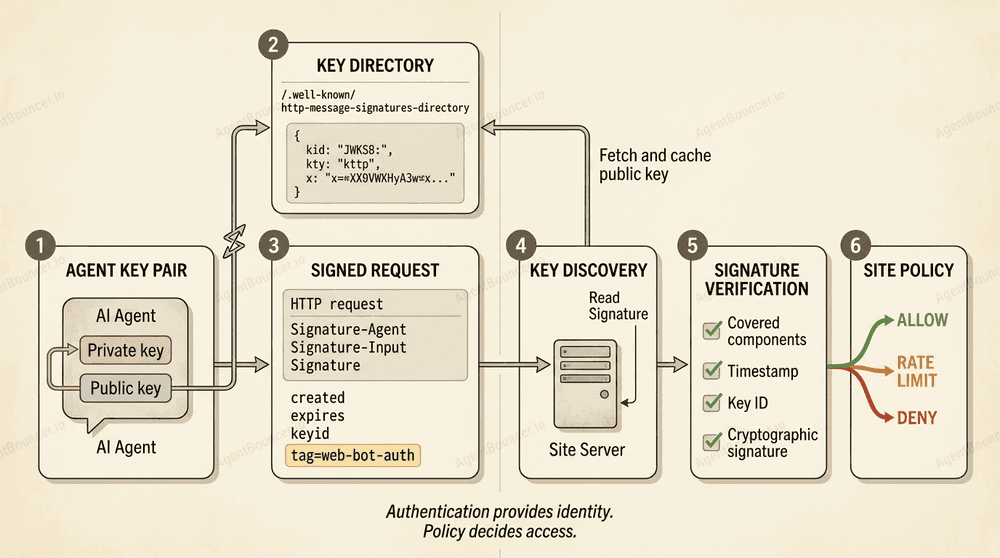
Web Bot Auth is an evolving IETF approach to cryptographic authentication for automated HTTP clients. A bot or AI agent signs a request with a private key, and the website verifies the signature using a published public key. Unlike a User-Agent string, the signature provides verifiable proof of key possession.
Web Bot Auth does not solve every security problem. Successful signature verification does not mean that the agent is automatically allowed to access content, place an order, call an API, bypass a rate limit, or perform an action on behalf of a user.
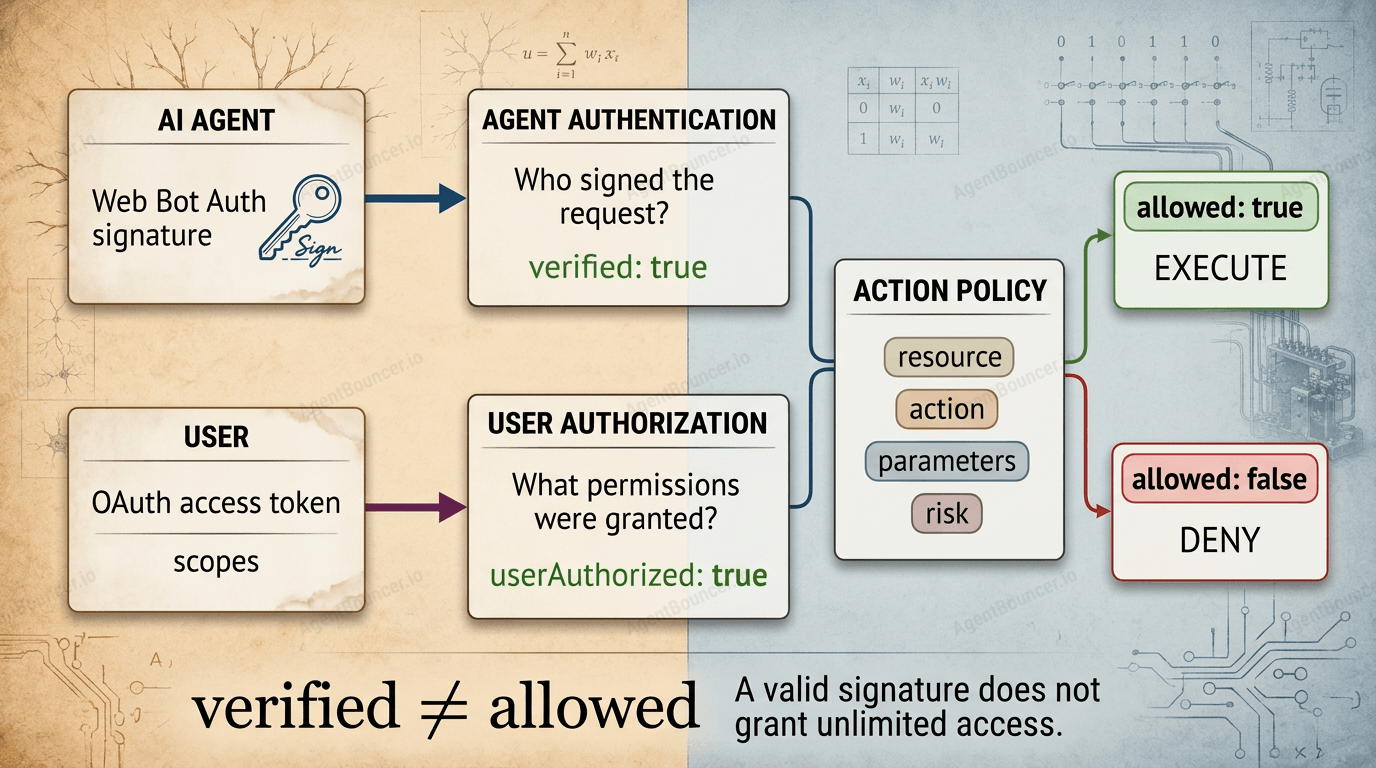
The central principle of this article is:
A verified agent identity does not equal an authorized action:
verified ≠ allowed.
According to Cloudflare Radar, at the time of verification on August 4, 2026, automated clients generated approximately 58.7% of HTTP requests for HTML content, while humans accounted for 41.3%. This metric is dynamic, but it clearly illustrates the scale of the issue: automated web traffic can no longer be treated as a secondary exception.
Key Takeaways
- Web Bot Auth is designed for the cryptographic authentication of bots and AI agents accessing websites.
- The mechanism is based on HTTP Message Signatures from RFC 9421.
- An agent signs selected HTTP request components with a private key.
Signature-Inputdescribes the covered components and signature parameters.Signaturecontains the cryptographic signature.Signature-Agenthelps the server discover the public key.created,expires, andnoncelimit the validity period and help protect against replay attacks.- Public keys can be published through a JWKS directory,
jwks_uri, or Signature Agent Card. - IP lists are not going away: the current registry draft defines
ips_urias an additional signal. - Web Bot Auth does not prove reputation, intent, user consent, or the right to use content.
- The IETF is also discussing an alternative model: anonymous bot authentication without revealing the exact identity of every client.
- As of August 4, 2026, the main Web Bot Auth documents remain individual Internet-Drafts. They have not been adopted as
draft-ietf-webbotauth-*working group documents and have not been published as RFCs.
Mini Glossary
| Term | Meaning in This Article |
|---|---|
| Agent identity | A cryptographically verifiable entity associated with a key |
| Verifier | A website, CDN, WAF, or service that verifies the signature |
| Profile | A set of requirements for signed components, timing, and algorithms |
| Key directory | An HTTPS resource that publishes an agent’s public keys |
| Signature Agent Card | A JSON document containing keys and additional agent metadata |
| Authorization | The decision determining whether a specific action is permitted |
| Access policy | Rules that convert verified signals into ALLOW, DENY, or an additional verification step |
| Replay attack | Reuse of a previously signed request |
Table of Contents
- Why Web Bot Auth Is Needed
- Specification Status
- How Web Bot Auth Works
- Web Bot Auth Headers
- Signature Agent Card and Key Discovery
- How to Verify a Signed Request
- Signature Algorithms
- What Web Bot Auth Proves
- What Web Bot Auth Does Not Prove
- Authentication and Authorization
- Replay Protection and Clock Skew
- POST Requests and Content-Digest
- Reverse Proxies and Multi-Layer Signatures
- Robots.txt and Content Usage Policies
- Responses to Unsigned and Invalid Requests
- Comparison With Other Mechanisms
- Who Uses Web Bot Auth
- Privacy, Criticism, and Alternatives
- How to Test Web Bot Auth
- How to Measure Adoption
- How AgentBouncer Complements Web Bot Auth
- Implementation Checklist
- Common Mistakes
- Frequently Asked Questions
- Changelog
<a id="why-web-bot-auth"></a>
Why Web Bot Auth Is Needed
Historically, websites have identified automated traffic using three primary signals:
| Signal | What It Communicates | Limitation |
|---|---|---|
User-Agent | What the client claims to be | Easy to spoof |
| IP address | Where the request came from | May be shared, dynamic, or owned by a cloud platform |
| Reverse DNS | Which domain is associated with the address | Does not work for every agent and requires additional verification |
For example, any HTTP client can send:
User-Agent: GooglebotThis alone does not prove that the request actually came from Google.
IP lists are more reliable than a simple User-Agent, but they still do not provide a universal identity:
- addresses change;
- cloud IPs are shared by different clients;
- an agent may operate through a browser platform or proxy;
- IP reputation does not always match the reputation of a particular application;
- publishing and synchronizing address ranges creates operational complexity;
- compromise of approved infrastructure can turn a trusted IP into a source of risk.
Web Bot Auth adds a cryptographic signal. The agent creates a signature with its private key, and the website verifies it using the corresponding public key.
IP addresses are not considered obsolete, however. The current draft-meunier-webbotauth-registry-03 defines an ips_uri field that operators can use to publish an agent’s address list.
A more accurate model is: the signature becomes the primary cryptographic proof, while IP addresses, User-Agent, reverse DNS, and behavioral data remain additional policy signals.
<a id="specification-status"></a>
Web Bot Auth Specification Status
As of August 4, 2026, the IETF Web Bot Auth Working Group is active. However, its main technical documents still have individual Internet-Draft status.
This means they:
- are not RFCs;
- do not represent final IETF consensus;
- do not have formal standards status;
- may be updated, replaced, or withdrawn;
- have not yet been adopted by the working group under
draft-ietf-webbotauth-*names.
Current Documents
| Document | Revision | Published | Expires | Status |
|---|---|---|---|---|
| HTTP Message Signatures for automated traffic | draft-meunier-webbotauth-httpsig-protocol-00 | June 26, 2026 | December 28, 2026 | Individual I-D |
| HTTP Message Signatures Directory | draft-meunier-webbotauth-httpsig-directory-00 | June 26, 2026 | December 28, 2026 | Individual I-D |
| Registry and Signature Agent Card | draft-meunier-webbotauth-registry-03 | June 26, 2026 | December 28, 2026 | Individual I-D |
| Use Cases for Authentication of Web Bots | draft-nottingham-webbotauth-use-cases-02 | April 1, 2026 | October 3, 2026 | Individual I-D |
| Anonymous Bot Authentication | draft-rescorla-anonymous-webbotauth-01 | July 19, 2026 | January 20, 2027 | Individual I-D |
draft-meunier-webbotauth-httpsig-protocol-00 replaced the earlier draft-meunier-web-bot-auth-architecture series. The new directory draft similarly replaced the previous draft-meunier-http-message-signatures-directory.
Important
An Internet-Draft should only be cited as work in progress. Implementations should pin a specific protocol revision and have an upgrade plan for incompatible changes.
Working Group Roadmap
The Web Bot Auth charter lists the following milestones:
- April 2026 — submit standards-track documents covering authentication methods to the IESG;
- April 2026 — submit documents covering the communication of additional bot information;
- August 2026 — submit an operational BCP to the IESG.
These dates are planned milestones, not confirmation that a standard has been published. As of August 4, 2026, the main documents under consideration are still listed in the Datatracker as individual drafts.
Scope
The working group charter focuses on automated clients accessing websites designed primarily for humans:
- search crawlers;
- web archivers;
- link checkers and validators;
- AI-training crawlers;
- AI agents that retrieve or modify web content on behalf of users.
The following are outside the formal scope:
- HTTP APIs designed exclusively for machines;
- agent-to-agent interfaces;
- end-user authentication;
- non-HTTP protocols;
- non-cryptographic identification;
- assigning reputation to individual bots;
- a universal authorization model.
At the same time, draft-nottingham-webbotauth-use-cases-02 shows that the boundaries and objectives of the project are still being discussed. The document separately examines controversial scenarios, potential centralization, and changes in the balance of power between websites and automated clients.
The scope therefore should not be treated as final until working group documents have been formally adopted.
<a id="how-web-bot-auth-works"></a>
How Web Bot Auth Works
The simplified process consists of seven steps.
1. The Operator Creates a Key Pair
The agent receives:
- a private key for signing;
- a public key for verification.
The private key must not leave the agent’s protected environment. It should be stored in a secret manager, KMS, or HSM.
2. The Public Key Is Published
The operator may use:
- an HTTP Message Signatures Directory;
- a direct
jwks_uri; - a Client ID Metadata Document;
- a Signature Agent Card;
- a prearranged directory;
- another supported discovery mechanism.
3. The Agent Creates an HTTP Request
GET /products/coffee-machine HTTP/1.1
Host: shop.example.com
User-Agent: ExampleShoppingAgent/1.0
4. The Agent Selects the Covered Components
The draft-meunier-webbotauth-httpsig-protocol-00 revision requires at least one of the following derived components:
@authority;@target-uri.
If the request contains Signature-Agent, the corresponding member of that dictionary must also be signed.
5. The Agent Creates a Signature
The signature parameters include:
created;expires;keyid;tag="web-bot-auth";- an optional
nonce; - the list of covered components.
6. The Website Discovers the Public Key
The verifier retrieves the key, locates it using keyid, and applies caching, rotation, and revocation rules.
7. The Website Verifies the Signature and Applies Its Policy
The cryptographic result may look like this:
{
  "verified": true,
  "agent": "https://agent.example.com/bot",
  "keyId": "NFcWBst6DXG-N35nHdzMrioWntdzNZghQSkjHNMMSjw"
}
A separate policy check is then performed:
{
  "allowed": false,
  "reason": "agent_not_allowed_for_checkout"
}
<a id="web-bot-auth-headers"></a>
Which Headers Does Web Bot Auth Use?
The primary headers are:
Signature-Input;Signature;- the optional but recommended
Signature-Agent.
A separate evolving draft defines Signature-Key as a more general composable key-discovery mechanism. The current Web Bot Auth protocol uses Signature-Agent by default but permits other deployment models.
Example of a signed request:
GET /products/coffee-machine HTTP/1.1
Host: shop.example.com
User-Agent: ExampleShoppingAgent/1.0
Signature-Agent: sig1="https://agent.example.com"
Signature-Input: sig1=("@authority" "signature-agent";key="sig1");created=1785859200;expires=1785859260;keyid="NFcWBst6DXG-N35nHdzMrioWntdzNZghQSkjHNMMSjw";nonce="RANDOM_BASE64URL_VALUE";tag="web-bot-auth"
Signature: sig1=:BASE64_SIGNATURE:
Some HTTP header values in this article are visually shortened. In an actual request, every field value must be transmitted in a valid HTTP format without obsolete line folding.
Signature-Agent
In the current directory draft, Signature-Agent is a Structured Field Dictionary:
Signature-Agent: sig1="https://agent.example.com"sig1 links the entry to a signature with the same label. RFC 9651, which replaced RFC 8941, should be used to parse Structured Fields.
Typed discovery variants are supported:
Signature-Agent: sig1="https://agent.example.com/jwks.json";type=jwks_uriSignature-Agent: sig1="https://agent.example.com/bot";type=cimdIf type is omitted, the value is interpreted as the origin for the standard directory mechanism.
Signature-Input
Signature-Input defines:
- the signature label;
- covered components;
- creation time;
- expiration time;
- key identifier;
- nonce;
- signature purpose;
- optionally, the algorithm.
Signature-Input: sig1=("@authority" "signature-agent";key="sig1");created=1785859200;expires=1785859260;keyid="NFcWBst6DXG-N35nHdzMrioWntdzNZghQSkjHNMMSjw";nonce="RANDOM_BASE64URL_VALUE";tag="web-bot-auth"tag="web-bot-auth" binds the signature to a specific application profile. It does not prove the agent’s reputation, but it prevents a signature from another context from being reused unless the verifier explicitly permits it.
Signature
Signature contains the result of the cryptographic operation:
Signature: sig1=:BASE64_SIGNATURE:The sig1 label must correspond to the entry in Signature-Input.
Revision Incompatibility
Real-world deployments may support earlier draft versions. For example, as of July 1, 2026, Cloudflare documentation still described the legacy string form:
Signature-Agent: "https://signature-agent.test"It also warned that the dictionary form from newer drafts might not pass verification in its current implementation.
An integration must therefore pin not only the name “Web Bot Auth,” but also the syntax revision supported by a specific CDN, WAF, or origin verifier.
<a id="signature-agent-card"></a>
Signature Agent Card and Public Key Discovery
RFC 9421 defines how to create and verify HTTP Message Signatures, but it does not provide a universal trust infrastructure or key-discovery system.
Web Bot Auth extends this model with directories and metadata.
HTTP Message Signatures Directory
A typical directory is published at a well-known URL:
https://agent.example.com/.well-known/http-message-signatures-directoryIt returns a JWK Set:
{
  "keys": [
    {
      "kty": "OKP",
      "crv": "Ed25519",
      "kid": "NFcWBst6DXG-N35nHdzMrioWntdzNZghQSkjHNMMSjw",
      "x": "PUBLIC_KEY_VALUE",
      "use": "sig",
      "nbf": 1785772800,
      "exp": 1788364800
    }
  ]
}
The keyid in Signature-Input must be a base64url-encoded SHA-256 JWK Thumbprint. RSA and EC keys follow RFC 7638, while Ed25519 uses the OKP representation referenced by the draft.
Signature Agent Card
draft-meunier-webbotauth-registry-03 defines the Signature Agent Card as a JSON metadata document. It uses parameters from the OAuth Dynamic Client Registration registry and adds a web_bot_auth object.
Example:
{
  "client_id": "https://agent.example.com/bot",
  "client_name": "Example Bot",
  "client_uri": "https://agent.example.com/about",
  "contacts": [
    "mailto:bot-support@example.com"
  ],
  "jwks_uri": "https://agent.example.com/.well-known/http-message-signatures-directory",
  "web_bot_auth": {
    "expected-user-agent": "ExampleBot/1.0",
    "rfc9309-product-token": "ExampleBot",
    "purpose": "search",
    "rate-expectation": "avg=10rps;max=100rps",
    "ips_uri": "https://agent.example.com/ips.json"
  }
}
Important rules in registry-03 include:
- when resolving the card through
client_id, theclient_idfield is required; client_idmust be an HTTPS URL;- the response must return
200 OK; - the verifier must not automatically follow redirects;
- the returned
client_idmust exactly match the requested URL; jwksandjwks_uriare mutually exclusive;jwks_urimust use HTTPS;- the resource at
jwks_urishould preferably be protected with HTTP Message Signatures; - no mandatory media type is defined for a JWK Set retrieved through
jwks_uri; ips_urican publish an additional IP address list;Signature-Keyis being considered as a potential composable carrier, but the draft does not yet define the corresponding scheme.
The card is based on the Client ID Metadata Document concept. As of August 4, 2026, the current revision is draft-ietf-oauth-client-id-metadata-document-02, published July 6, 2026, rather than the March -01 revision.
Secure Metadata Retrieval
A verifier must not retrieve arbitrary URLs from incoming requests without restrictions. Otherwise, key discovery becomes an SSRF vector.
A production verifier should:
- allow HTTPS only;
- block loopback, link-local, and private network addresses;
- refuse redirects where the draft prohibits them;
- revalidate DNS and IP addresses before connecting;
- use short timeouts;
- restrict response sizes;
- validate JSON and JWK data;
- reject private JWK parameters;
- enforce an algorithm allowlist;
- limit requests to unknown directories;
- cache successful results;
- apply negative caching carefully;
- deny trusted access until key discovery is complete.
Media type requirements depend on the selected discovery mechanism and implementation. For jwks_uri, the registry draft explicitly notes that RFC 7591 does not require a specific media type.
<a id="verify-signed-request"></a>
How to Verify a Signed Request
A recommended verification pipeline is:
- Receive the original HTTP request.
- Locate
SignatureandSignature-Input. - Select a supported signature label.
- Parse Structured Fields correctly.
- Verify
tag="web-bot-auth". - Check the required covered components.
- Validate
createdandexpires. - Validate the permitted validity-window length.
- Check
nonceif required by local policy. - Determine the key-discovery mechanism.
- Securely retrieve and validate the public key.
- Confirm that
keyidmatches the JWK Thumbprint. - Reconstruct the signature base according to RFC 9421.
- Verify the cryptographic signature.
- Check the replay cache.
- Determine the agent identity or class.
- Apply rate limits, content rules, and access policies.
- Allow, restrict, request additional verification, or reject the request.
Cryptographic and policy results should be stored separately:
{
  "verified": true,
  "identity": "https://agent.example.com/bot",
  "keyId": "NFcWBst6DXG-N35nHdzMrioWntdzNZghQSkjHNMMSjw",
  "signatureAgeMs": 412,
  "replay": "not_detected",
  "allowed": false,
  "reason": "path_not_allowed_for_agent"
}
<a id="signature-algorithms"></a>
Which Signature Algorithms Should You Use?
RFC 9421 registers several algorithms, including:
ed25519;ecdsa-p256-sha256;ecdsa-p384-sha384;rsa-pss-sha512;rsa-v1_5-sha256;hmac-sha256.
Shared-secret algorithms such as HMAC are generally unsuitable for an open Web Bot Auth ecosystem because websites would have to exchange a secret with every operator in advance.
The practical choice for new implementations is Ed25519, provided that every participant in the request chain supports it:
- compact keys and signatures;
- convenient JWK representation;
- strong performance;
- support in the protocol draft’s test vectors;
- current support in Cloudflare Web Bot Auth.
RSA-PSS may be necessary for compatibility with existing PKI or infrastructure. ECDSA P-256 remains a widely used option, but the verifier must ensure that its cryptographic library handles the signature format correctly and prevents algorithm ambiguity.
The verifier should use an explicit allowlist:
ed25519
rsa-pss-sha512
ecdsa-p256-sha256
The algorithm must not be selected solely from an unverified request value. It must match the key material, supported profile, and local policy.
<a id="what-web-bot-auth-proves"></a>
What Web Bot Auth Proves
When implemented correctly, a valid signature proves the following.
Possession of the Private Key
The request was signed by a party controlling the private key corresponding to the public key.
Integrity of Covered Components
If a component is included in the signature base, modifying it will cause verification to fail.
For example:
@authoritybinds the signature to the HTTP authority;@target-uriprotects the complete target URI;@methodprotects the HTTP method;@pathprotects the request path;content-digestbinds the signature to the request body bytes.
Signature Purpose
tag="web-bot-auth" indicates that the signature was created for the Web Bot Auth profile.
Limited Validity Period
created and expires allow the verifier to reject signatures that are too old, expired, or created too far in the future.
Association With a Published Identifier
If key discovery and directory validation are performed correctly, the request can be associated with a particular client_id, origin, or other agent identifier.
The strength of this association depends not only on signature mathematics, but also on the key-discovery mechanism, domain control, registry policy, and private-key security.
<a id="what-web-bot-auth-does-not-prove"></a>
What Web Bot Auth Does Not Prove
Web Bot Auth does not automatically prove that:
- the agent is safe or trustworthy;
- the operator follows
robots.txt; - the request matches the declared purpose;
- the user is authenticated;
- the user authorized the specific action;
- the agent has the right to use content for training;
- the AI model has not been affected by prompt injection;
- the signing key has not been stolen;
- the request is not a replay;
- the website should remove a CAPTCHA or increase a rate limit;
- the agent is authorized to work with a particular account.
A more accurate decision model looks like this:
| Layer | Question |
|---|---|
| Cryptographic verification | Who controls the signing key? |
| Identity discovery | Which agent or operator is associated with the key? |
| Reputation and behavior | How has this client behaved in the past? |
| User authorization | Who authorized the operation? |
| Content policy | Can this material be retrieved and used? |
| Action policy | Is this particular action permitted with these parameters? |
<a id="authentication-and-authorization"></a>
Agent Authentication and Access Authorization
Web Bot Auth primarily answers this question:
Which automated client controls the key that signed this request?
It does not answer:
- which user controls the agent;
- which permissions the user granted;
- whether an operation may be performed;
- whether confirmation is required;
- whether specific parameters are allowed.
Example: Browsing a Product Catalog
| Check | Result |
|---|---|
| Agent signature | Valid |
| Resource | Public catalog |
| Rate limit | Not exceeded |
| Policy | ALLOW |
Example: Reading Orders
| Check | Result |
|---|---|
| Agent signature | Valid |
| User session | Missing |
| Policy | REQUIRE_LOGIN |
Example: Expensive Purchase
| Check | Result |
|---|---|
| Agent signature | Valid |
| User | Authenticated |
| Price | USD 5,000 |
| Autonomous purchase limit | USD 500 |
| Policy | REQUIRE_USER_CONFIRMATION |
User-related operations may additionally require:
- an OAuth access token;
- a cookie or session credential;
- a passkey;
- a consent record;
- transaction confirmation;
- spending limits;
- risk evaluation;
- a policy engine.
Read more: “AI Agent Authentication vs. Authorization: What Is the Difference?”.
<a id="replay-and-clock-skew"></a>
Replay Protection, nonce, and Clock Synchronization
A digital signature does not make a request single-use. An attacker may attempt to resend an intercepted valid request.
This is particularly dangerous for operations with side effects:
- submitting a form;
- creating an order;
- changing data;
- making a reservation;
- processing a payment;
- calling a tool;
- issuing a temporary secret.
created and expires
The protocol draft requires created and expires and recommends a validity period of no more than 24 hours. For sensitive actions, that is too broad: a production profile should usually use minutes or seconds.
Signature-Input: sig1=("@authority");created=1785859200;expires=1785859260;keyid="...";tag="web-bot-auth"In this example, the signature is valid for 60 seconds.
nonce
The protocol draft recommends a base64url-encoded random 64-byte array. The client must keep the nonce unique within the signature window. The verifier decides how strict server-side nonce validation should be.
Clock Skew
An overly short validity window increases sensitivity to clock synchronization issues.
A recommended operational model is:
- synchronize servers and signing nodes using NTP;
- reject
createdtimestamps that are significantly in the future; - define a small permitted clock-skew allowance;
- log
future_created,expired, andwindow_too_longseparately; - do not automatically extend the window when synchronization errors occur;
- apply stricter settings to operations with side effects.
For example, a website may allow up to 30 seconds of clock skew and a signature window of up to 120 seconds. This is a local policy rather than a universal Web Bot Auth requirement.
The draft explicitly recognizes the trade-off: shorter validity periods reduce replay risk but increase sensitivity to clock skew.
Replay Cache
A fingerprint may include:
keyid;- signature label;
Signaturevalue;nonce;@authority;@target-uri;expires.
Repeated use of the same fingerprint should be rejected:
{
  "verified": false,
  "allowed": false,
  "reason": "replay_detected"
}
Rate limiting does not replace replay protection. It restricts traffic volume but may still allow a repeated transaction within the permitted limit.
<a id="content-digest"></a>
Signing POST Requests and Content-Digest
The minimal Web Bot Auth profile does not always require the method, path, or body to be signed. That minimal set is not sufficient for transactional requests.
POST /checkout HTTP/1.1
Host: shop.example.com
Content-Type: application/json{
"productId": "product-42",
"quantity": 1
}If the signature covers only @authority, it does not protect:
- the HTTP method;
- the path;
- the product identifier;
- the quantity;
- other JSON fields.
A sensitive request requires a stricter application profile:
POST /checkout HTTP/1.1
Host: shop.example.com
Content-Type: application/json
Content-Digest: sha-256=:BODY_DIGEST:
Signature-Agent: sig1="https://agent.example.com"
Signature-Input: sig1=("@method" "@authority" "@path" "content-digest" "signature-agent";key="sig1");created=1785859200;expires=1785859260;keyid="NFcWBst6DXG-N35nHdzMrioWntdzNZghQSkjHNMMSjw";nonce="RANDOM_BASE64URL_VALUE";tag="web-bot-auth"
Signature: sig1=:BASE64_SIGNATURE:
Content-Digest from RFC 9530 binds the request to the exact body bytes.
The correct processing order is:
- Read the raw body.
- Calculate the digest.
- Compare it with
Content-Digest. - Verify the HTTP Message Signature.
- Check the replay cache.
- Apply the authorization policy.
- Parse the JSON.
- Perform the action.
If the application calls JSON.parse() first and then serializes the object again, the resulting bytes may differ from the signed bytes.
The extended set of @method, @authority, @path, and content-digest is a secure application profile for transactions, not a minimum requirement of the current Web Bot Auth draft.
<a id="reverse-proxy"></a>
Web Bot Auth, Reverse Proxies, and Multi-Layer Signatures
In production, a request often passes through multiple components:
- a CDN;
- a WAF;
- a load balancer;
- a reverse proxy;
- an application server.
The signature may be verified at the edge. This makes it possible to centralize:
- key discovery;
- caching;
- replay protection;
- bot classification;
- rate limiting;
- basic policy evaluation.
Modifying Signed Components
An intermediary may change:
Host;- the scheme;
- the path;
- the query string;
- header formatting;
- the external URL.
The verifier must reconstruct the exact request context signed by the agent. It must not silently replace an external https://shop.example.com/path URL with an internal http://service:8080/path URL.
Trusting Edge Verification Results
A backend must not trust an external header such as:
X-Agent-Verified: trueThe edge should:
- Remove incoming assertion headers.
- Verify the signature.
- Add its own internal assertion.
- Transmit the assertion through an authenticated channel.
- Restrict backend access to trusted infrastructure.
Multi-Layer Signatures
Consider this request chain:
- A user launches a browser-based agent.
- The agent operates through a cloud browser platform.
- The platform sends a request to a website.
The request may contain:
- the agent’s signature;
- the platform’s signature;
- an intermediary signature covering an existing signature.
The current protocol draft permits multiple signatures and allows one party to cover selected members of another signature. This preserves evidence that multiple parties participated.
Multiple signatures alone, however, do not prove delegation, user consent, or permission to perform an action. Those claims must be communicated separately and evaluated by policy.
<a id="robots-and-content-policy"></a>
Web Bot Auth, Robots.txt, and Content Usage Rules
Web Bot Auth answers questions about the client’s cryptographic authenticity. It does not grant permission to:
- index a page;
- use data to train a model;
- create derivative materials;
- bypass a paywall;
- ignore
robots.txt; - retain personal data;
- use content commercially.
robots.txt is standardized by RFC 9309 and remains a separate mechanism for declaring crawler policy.
A Signature Agent Card may contain additional metadata:
rfc9309-product-token;- a claimed commitment to following rules;
purpose;- expected request rate;
- a description of the target content.
These fields are useful to a policy engine, but they remain operator claims. The signature protects them against undetected modification, but it does not guarantee that the agent actually behaves as declared.
The same applies to AIPREF, Content Signals, and other evolving mechanisms for expressing content-owner preferences. They complement Web Bot Auth rather than being replaced by it.
The Web Bot Auth charter explicitly provides for interaction with AIPREF while preserving the separation between authentication and content policy.
<a id="server-responses"></a>
How to Respond to Unsigned or Invalid Requests
Web Bot Auth does not yet define a universal error format for every implementation. The response depends on whether the server requires a signature, whether it could parse the request, and whether policy prohibits the action.
Recommended Response Matrix
| Situation | Status | Comment |
|---|---|---|
Invalid Signature or Structured Fields syntax | 400 Bad Request | The request cannot be processed correctly |
| The server requires Web Bot Auth, but the signature is missing | 403 Forbidden | The protocol draft recommends Accept-Signature when requesting a signature |
| The signature is valid, but the action is prohibited | 403 Forbidden | Identity is known, but permission is absent |
| Replayed signature or a new nonce is required | 429 Too Many Requests | The draft allows the server to request a new signature |
| Rate limit exceeded | 429 Too Many Requests | Include a clear retry policy |
| Verification is temporarily unavailable | 503 Service Unavailable | A verifier failure must not result in automatic access |
The protocol draft recommends 403 together with Accept-Signature when the origin requests an HTTP Message Signature. For suspected replay or when requesting a new signature, the draft permits 429. Parsing errors may return 400.
Example:
HTTP/1.1 403 Forbidden
Accept-Signature: sig1=("@authority");tag="web-bot-auth"
Cache-Control: no-store
Content-Type: application/problem+json{
"type": "https://example.com/problems/web-bot-auth-required",
"title": "Web Bot Auth signature required",
"status": 403,
"code": "web_bot_auth_required"
}For an invalid signature:
{
  "type": "https://example.com/problems/invalid-agent-signature",
  "title": "Agent signature could not be verified",
  "status": 403,
  "code": "invalid_agent_signature"
}
The response should not expose:
- internal key-service URLs;
- replay cache contents;
- private policy rules;
- details that simplify key enumeration;
- distinctions that could be used to probe an internal network through SSRF.
Avoiding Damage to Search Crawlers
Mandatory signatures should be introduced gradually:
- Start by collecting metrics.
- Separate known crawlers from unknown clients.
- Determine which clients actually support signatures.
- Retain fallback verification based on officially documented IP addresses and reverse DNS.
- Enable enforcement on individual paths.
- Do not block the entire website solely because a signature is missing without analyzing the SEO consequences.
<a id="comparison"></a>
Web Bot Auth Compared With Other Mechanisms
| Mechanism | What It Proves | Protects HTTP Components | Main Limitation |
|---|---|---|---|
User-Agent | Claimed identity | No | Easy to spoof |
| IP allowlist | Network source | No | Addresses change and may be shared |
| Reverse DNS | Association between an IP and domain | No | Not universal |
| API key | Possession of a shared secret | Usually no | Secure secret distribution is difficult |
| OAuth bearer token | Delegated permissions | No | A stolen bearer token can be reused |
| DPoP | Possession of a key bound to an OAuth token | Partially | Coupled to OAuth |
| mTLS | Client identity within a TLS connection | Indirectly | More difficult to deploy on the open web |
| Web Bot Auth | Key possession and integrity of covered components | Yes | Does not determine final authorization |
| Anonymous Bot Authentication | Membership in an acceptable class | Depends on the construction | Reduces precise auditing capabilities |
Web Bot Auth and OAuth
Web Bot Auth answers:
Who signed the HTTP request?
OAuth answers:
Which permissions were granted to the client?
Actions performed on behalf of users may require both:
- agent identity;
- user authorization;
- action policy.
Web Bot Auth and mTLS
mTLS authenticates the client within a TLS connection. Web Bot Auth signs the HTTP message and can work in infrastructure where TLS terminates at a CDN or reverse proxy.
mTLS is particularly useful in closed systems with centrally managed clients. Web Bot Auth is designed for a more open web ecosystem.
<a id="adoption"></a>
Who Already Uses Web Bot Auth?
The following list includes only deployments confirmed through primary documentation as of August 4, 2026.
Google is experimenting with Web Bot Auth for some Google-Agent requests. Signed requests are associated with:
https://agent.bot.googGoogle explicitly warns that not every request is signed. Its documentation still verifies the main Googlebot using User-Agent, IP addresses, and reverse DNS.
It would therefore be inaccurate to claim that all Googlebot traffic has already moved to Web Bot Auth.
Verified: August 4, 2026.
Cloudflare
Cloudflare uses Web Bot Auth as one method of verifying Verified Bots. Other methods still include a published IP list combined with a stable User-Agent, as well as reverse DNS.
Since July 1, 2026, signed agents have been included in the broader Verified Bots model, while direct and intermediary access are represented using separate metadata. Verified status is available to Cloudflare WAF and rate-limiting rules through Cloudflare fields.
Verified: August 4, 2026.
AWS WAF
AWS WAF Bot Control supports Web Bot Auth verification for CloudFront distributions beginning with version 4.0 of AWSManagedRulesBotControlRuleSet.
The result is represented through labels:
web_bot_auth:verified;web_bot_auth:invalid;web_bot_auth:expired;web_bot_auth:unknown_bot.
These labels make it possible to allow, block, or restrict particular agent names and categories separately.
Verified: August 4, 2026.
Amazon Bedrock AgentCore Browser
Web Bot Auth in Amazon Bedrock AgentCore Browser remains in Preview. When browser signing is enabled, the service adds Signature, Signature-Input, and Signature-Agent.
AWS lists Cloudflare, HUMAN Security, Akamai Technologies, and DataDome among the supported bot-control vendors. Website owners retain complete control over access and may block or restrict even a correctly signed agent.
Verified: August 4, 2026.
Shopify
On May 7, 2026, Shopify announced stricter restrictions for automated traffic accessing the Storefront API and Shopify-hosted storefront pages.
Unsigned anonymous bots receive the strictest limits. Traffic signed with Web Bot Auth may qualify for a higher tier, but the signature does not override Shopify’s protective rules.
Verified: August 4, 2026.
What These Deployments Show
Web Bot Auth is already being used for:
- protecting against impersonation of known bots;
- classifying AI-agent traffic;
- configuring separate rate limits;
- reducing reliance on static IP addresses;
- reducing CAPTCHA challenges for known agents;
- creating policies based on operator, category, or access type.
Practical interoperability remains fragmented. Different platforms may support different Signature-Agent revisions, signature algorithms, and key-registration methods.
<a id="privacy-and-alternatives"></a>
Privacy, Open-Web Risks, and Alternatives
Direct cryptographic identification gives websites a powerful control mechanism. It enables a website to:
- track the behavior of a specific agent;
- assign an individual rate limit;
- build a history of policy violations;
- apply an allowlist or denylist;
- distinguish one operator from another.
That level of precision also creates risks for the open web.
draft-rescorla-anonymous-webbotauth-01 notes that exact identification enables websites to selectively discriminate against particular bots, including bots operating in the public interest. Examples include tools used to monitor government agencies, investigate discrimination in advertising, and compare prices.
Anonymous Bot Authentication
The proposed alternative uses anonymous credentials.
Instead of learning the bot’s exact identity, the website learns that the client:
- obtained a credential from an approved anchor or attester;
- belongs to an acceptable class;
- can participate in a specified rate-limiting scheme.
The website does not necessarily learn which individual operator sent the request.
This approach can help prove:
- membership in a group of compliant bots;
- permission to send a defined volume of traffic;
- participation in a certification or payment program;
- eligibility without disclosing an individual identity.
The cost of this privacy is less precise auditing. Anonymous Bot Authentication is less suitable for individual denylisting, investigating the behavior of a specific agent, and authenticating site services.
The draft remains an early individual proposal and has not undergone a complete security analysis.
Behavioral Triggers Instead of Universal Identification
Another model is to avoid requiring identity from every client in advance.
A website can:
- Analyze request rate and behavior.
- Allow ordinary traffic.
- Request authentication when it detects automation or potential abuse.
- Apply a rate limit after receiving a credential.
This lowers the barrier for new and smaller bots, which would not have to register before making their first request.
Paid Access Instead of Blocking
Paid content access is another economic alternative.
Cloudflare Pay Per Crawl uses HTTP 402 Payment Required: an AI crawler either provides payment intent or receives an access price. Cloudflare acts as the merchant of record.
In this model, Web Bot Auth works alongside payment to associate payment and access rules with a verified agent.
Cloudflare also publishes x402 templates for payment-gated HTTP resources. Payment, however, does not automatically grant authorization any more than a signature does:
Payment confirms that an economic condition has been met. Policy must still determine whether this particular client may receive the resource.
<a id="testing"></a>
How to Test Web Bot Auth
1. Create an Ed25519 Key
openssl genpkey -algorithm ed25519 -out private-key.pem
openssl pkey -in private-key.pem -pubout -out public-key.pem
Next, convert the public key to JWK format and calculate its SHA-256 JWK Thumbprint.
2. Publish the Key Directory
https://agent.example.com/.well-known/http-message-signatures-directoryDo not publish the d parameter or any other private JWK components.
3. Sign a Test Request
Start with a safe GET request and a short validity period:
GET /test HTTP/1.1
Host: example.com
Signature-Agent: sig1="https://agent.example.com"
Signature-Input: sig1=("@authority" "signature-agent";key="sig1");created=1785859200;expires=1785859260;keyid="JWK_THUMBPRINT";nonce="RANDOM_VALUE";tag="web-bot-auth"
Signature: sig1=:BASE64_SIGNATURE:
4. Use Official Test Materials
Cloudflare publishes libraries and examples in the cloudflare/web-bot-auth repository. The crawltest.com/cdn-cgi/web-bot-auth test endpoint can be used to check Cloudflare’s current implementation.
At the time of verification, the endpoint returned:
200when a known key and signature were successfully verified;401when the format was valid but the key was unknown, or when verification failed for a known key;400for format errors.
Keep in mind that Cloudflare’s test environment may support an earlier Signature-Agent format than the current IETF draft.
5. Add Negative Tests
Make sure to test:
- an invalid signature;
- an unknown
keyid; - an expired
expires; createdset in the future;- a repeated
nonce; - a modified
@authority; - a modified path;
- a modified body;
- an incorrect
Content-Digest; - an unsafe directory URL;
- a redirect to a private IP address;
- an excessively large JWKS;
- an unsupported algorithm;
- mismatched labels.
<a id="monitoring-and-rollout"></a>
Measuring Adoption: Monitor Mode → Enforcement
Immediately blocking all unsigned traffic is risky.
What to Log
Recommended fields include:
- timestamp;
- request ID;
- source IP;
User-Agent;- signature label;
keyid;- algorithm;
Signature-Agent;- discovery type;
- discovered identity;
- signature result;
- signature age;
- validity window;
- replay result;
- directory cache status;
- verification latency;
- declared
purpose; - request path and method;
- rate-limit tier;
- policy result;
- denial reason.
Do not log private keys, user tokens, sensitive body content, or complete payment credentials.
Stage 1: Observation
- Verify signatures without blocking requests.
- Measure the share of signed and unsigned traffic.
- Identify vendor compatibility issues.
- Compare
User-Agent, IP, and cryptographic identity. - Detect clock-skew and key-rotation errors.
Stage 2: Soft Policy
- Increase rate limits for verified agents.
- Restrict unknown automated traffic.
- Do not change access to critical operations.
- Add warnings to the administrative dashboard.
Stage 3: Route-Specific Enforcement
- Require signatures for expensive resources.
- Retain fallback verification for known SEO crawlers.
- Protect checkout, forms, and account pages separately.
- Never allow actions solely because
verified: true.
Stage 4: Complete Policy Model
- agent allowlists and denylists;
- rules based on
purpose; - separate limits for direct and intermediary access;
- user authorization;
Content-Digest;- a replay cache;
- risk-based confirmation;
- audit and incident response.
<a id="agentbouncer"></a>
How AgentBouncer Complements Web Bot Auth
Web Bot Auth focuses on the cryptographic authentication of an automated HTTP client.
AgentBouncer uses that result as one input in a broader security model:
- RFC 9421 HTTP Message Signature verification;
- public-key discovery;
Signature-Agentvalidation;Content-Digest;- replay protection;
- agent identification;
- OAuth user authorization;
- action-specific policy;
- rules for API endpoints and MCP tools.
A conceptual result looks like this:
{
  "verified": true,
  "userAuthorized": true,
  "allowed": false,
  "reason": "tool_not_allowed_for_agent"
}
The critical check is:
if (!verification.allowed) {
  deny();
}
The following approach is unsafe:
if (verification.verified) {
  executeSensitiveAction();
}
The formal scope of Web Bot Auth focuses on websites intended for human users. AgentBouncer also applies related cryptographic mechanisms to APIs and MCP servers, where tool-level authorization and parameter validation are additionally required.
<a id="implementation-checklist"></a>
Web Bot Auth Implementation Checklist
For Agent Operators
- Create a dedicated asymmetric key pair.
- Prefer Ed25519 when supported by every participant.
- Store the private key in a KMS, HSM, or secret manager.
- Never publish private JWK fields.
- Use HTTPS for metadata and keys.
- Calculate
keyidas a SHA-256 JWK Thumbprint. - Include
createdandexpires. - Use a short validity window.
- Add a unique
nonce. - Include
tag="web-bot-auth". - Sign the corresponding
Signature-Agentmember. - For transactions, sign the method, authority, path, and
Content-Digest. - Create a new signature for every attempt.
- Support key rotation and revocation.
- Do not reuse one key across independent security contexts.
- Publish
ips_urionly as an additional signal. - Verify compatibility with the vendor’s specific draft revision.
For Websites and Verifiers
- Use a correct RFC 9651 parser.
- Validate labels across all related headers.
- Validate
tag. - Verify the required covered components.
- Validate
created,expires, and clock skew. - Restrict the maximum validity window.
- Locate the key strictly by
keyid. - Match
keyidagainst the JWK Thumbprint. - Enforce an algorithm allowlist.
- Protect key discovery against SSRF.
- Respect the prohibition on redirects for CIMD discovery.
- Verify that
jwksandjwks_uriare not used together. - Verify signatures according to RFC 9421.
- Verify
Content-Digestagainst the raw body. - Store used nonces or signature fingerprints.
- Keep
verifiedseparate fromallowed. - Do not let verification-service failures cause fail-open behavior.
- Introduce enforcement only after monitor mode.
- Log denial reasons without leaking sensitive information.
<a id="common-mistakes"></a>
Common Mistakes
1. Trusting Signature-Agent by Itself
The header can be spoofed. It becomes meaningful only after signature verification and secure key discovery.
2. Treating tag as Proof of Identity
tag="web-bot-auth" identifies the signature context, but it does not prove who owns the key.
3. Automatically Allowing Every verified Request
A signature is an input to policy, not the final decision.
4. Using Long-Lived Signatures
The longer the validity window, the greater the replay risk.
5. Failing to Validate nonce
A valid signature does not necessarily represent a new request.
6. Signing Only @authority for Transactions
Requests that change data should protect the method, path, and body.
7. Parsing JSON Before Verifying the Digest
The digest must be calculated from the original bytes.
8. Retrieving Arbitrary URLs Without SSRF Protection
The discovery mechanism must not be able to access localhost, cloud metadata endpoints, or internal services.
9. Requiring a Media Type Where the Draft Does Not Define One
The registry draft does not require a particular media type for jwks_uri. Validation must follow the selected discovery profile.
10. Ignoring Draft Incompatibilities
Support for the legacy string form and the Structured Field Dictionary form may differ between vendors.
11. Treating a Signature as User Consent
A platform key may be shared across many users. User authorization must be verified separately.
12. Failing to Plan for Rotation
The verifier must refresh its cache and remove keys that no longer appear in the current directory.
<a id="faq"></a>
Frequently Asked Questions
What Is Web Bot Auth in Simple Terms?
Web Bot Auth allows a bot to sign an HTTP request with a private key. The website retrieves the corresponding public key and verifies that the request was signed by the holder of that private key.
Is Web Bot Auth a Final RFC?
No. As of August 4, 2026, the primary documents remain individual Internet-Drafts and may change.
Does Web Bot Auth Replace OAuth?
No. Web Bot Auth authenticates an automated client, while OAuth describes the permissions granted to that client. Actions performed on behalf of users may require both.
Is Content-Digest Required?
Not always for a typical GET request without a body. For POST, PUT, and PATCH requests containing important parameters, Content-Digest should be calculated and included in the signature.
Does Web Bot Auth Prevent Replay Attacks?
Not automatically. You need a short validity period, a unique nonce, and a server-side replay cache.
Must a Website Allow a Verified Agent?
No. A website may allow, restrict, rate-limit, monetize, or block a correctly signed request.
Does Web Bot Auth Make IP Lists Obsolete?
No. The current registry draft defines ips_uri. IP addresses become an additional signal rather than the only proof of identity.
Can HTTP Message Signatures Be Used With MCP?
Yes. The technical mechanisms from RFC 9421 and RFC 9530 can be applied to MCP over HTTP.
However, MCP and machine-only APIs are outside the formal scope of the Web Bot Auth Working Group and require their own OAuth and tool-authorization models.
Conclusion
Web Bot Auth addresses an important problem of the modern web: User-Agent, IP addresses, and reverse DNS no longer provide sufficiently precise identification for the growing number of AI crawlers, browser agents, and automated clients.
A cryptographic signature can prove key possession and protect selected components of an HTTP request.
A production security model, however, is always broader:
- cryptographic identity;
- secure key discovery;
- body integrity;
- replay protection;
- reputation and behavior;
- content usage rules;
- user authorization;
- action-level policy.
Web Bot Auth helps answer:
Who signed this request?
The website’s policy must answer:
What is this agent allowed to do?
Protect your API or MCP server with AgentBouncer — start in monitor mode, analyze real agent traffic, and enable blocking policies only after you understand the results.
Previous articles:
<a id="changelog"></a>
Changelog
August 4, 2026
- Added the current
protocol-00,directory-00, andregistry-03revisions. - Clarified that the primary Web Bot Auth drafts remain individual submissions.
- Replaced RFC 8941 with RFC 9651.
- Added
draft-nottingham-webbotauth-use-cases-02. - Added a section about Anonymous Bot Authentication.
- Updated information about
jwks,jwks_uri,client_id,ips_uri, andSignature-Key. - Added AWS WAF and updated the status of AgentCore, Cloudflare, and Shopify.
- Added server responses, algorithms, clock skew, testing, and the monitor-mode roadmap.
- Updated the Client ID Metadata Document reference to revision
-02.
Sources
IETF and RFC Documents
- IETF Web Bot Auth Working Group
- HTTP Message Signatures for Automated Traffic — protocol-00
- HTTP Message Signatures Directory — directory-00
- Registry and Signature Agent Card — registry-03
- Use Cases for Authentication of Web Bots — use-cases-02
- Anonymous Bot Authentication — anonymous-webbotauth-01
- OAuth Client ID Metadata Document — CIMD-02
- RFC 9421 — HTTP Message Signatures
- RFC 9530 — Digest Fields
- RFC 9651 — Structured Field Values for HTTP
- RFC 7638 — JSON Web Key Thumbprint
- RFC 7517 — JSON Web Key
- RFC 9309 — Robots Exclusion Protocol
Real-World Implementations and Tools
- Google: Authenticate Requests With Web Bot Auth
- Google: Overview of Crawlers and Fetchers
- Cloudflare: Verified Bots
- Cloudflare: Web Bot Auth Implementation
- Cloudflare: Web Bot Auth GitHub Repository
- Cloudflare Radar
- AWS WAF Bot Control
- AWS WAF Bot Control Labels
- Amazon Bedrock AgentCore: Web Bot Auth
- Shopify: Bots and Agents Should Identify Themselves via Web Bot Auth
- Shopify API Limits
- Cloudflare Pay Per Crawl
- Cloudflare x402 Payment-Gated Proxy